
4 Family Friendly Workouts That Combine Fitness with Fun
Last updated on November 14th, 2018 at 10:38 pm
 For those of us busy with family, work and life, our workout routines are often the first to get the pink slip. But they shouldn’t be. In fact, physical activity is important for easing stress, boosting energy levels and warding off chronic diseases.
What’s the solution for fitting it all in? Make workout routines a family affair. You’ll get your heart pumping and your children will also learn healthy habits. In fact, a recent study from Oregon State University found that parents play a pivotal role in whether their kids become active or turn into couch potatoes. And with 17 percent of children currently overweight or obese, it’s especially important teach your little ones about fitness at an early age.
With that in mind, consider my four suggestions to combine workouts with family time. I guarantee you’ll have a blast while working up a sweat!
Family Workout Routine No. 1: Circuit Station
Stuck at home or trapped inside? Create a boot-camp style workout for the whole family: Set up five or six stations of body-weight exercises, such as jumping jacks, push-ups, lunges and squats. Assign each member of the family to a different station and rotate every 15 to 30 seconds.
For an extra push, run a lap around the yard (or house) after each circuit. Cycle through the stations five times. Don’t forget to keep a box of tissues to wipe away the sweat and a bottle of water on hand.
Family Workout Routine No. 2: At the Track
Take advantage of the track at your local middle or high school. Bring a soccer ball for your kids to play with in the center of the track as you walk or run. To ramp up the intensity, do intervals: Alternate between sprinting and walking laps. Are your kids too young to play on their own? Push them in a jogging stroller.
Family Workout Routine No. 3: Dance Party
Get your heart pumping with some fast-paced tunes! Put on your favorite workout music and start dancing with your kids. You’ll burn up to 330 calories an hour, according to the Centers for Disease Control and Prevention. Not sure how to get your groove going? Try a dance workout DVD or an interactive video game.
Family Workout Routine No. 4: At the Playground
Don’t stay on the sidelines — join in on the fun! Race your kids up and down the steps and slide, or bring a jump rope and let your kids count while you skip. Make sure to bring a pack of to-go tissues to clean off dirt and wipe up the sweat.
You can also turn the playground into your personal gym with these moves:
- Walking lunges: Start in a standing position with your feet together. Step forward with your right leg. Bend both knees, lowering your hips to the ground. Your right knee should be directly over your ankle with your left knee facing the ground. Push up with your left foot and return back to the starting position. Repeat, leading with your left leg. For an extra challenge, carry one of your children as you lunge.
- Monkey bar pull-ups: If you can’t quite do a full pull-up, just hang in there. Hold the pull-up position — with your chin above the bar — and count backward from 10. Repeat three times.
- Decline push-ups: Place your toes on the edge of the slide and plant your palms on the ground. Bend your elbows and lower until your face is a few inches from the ground. Do two sets of 10.
- Step-ups on a bench: Do 20 step-ups with your right leg, followed by 20 with your left leg.
- Triceps dips: Begin sitting on a bench, with your hands next to or slightly beneath your hips. Lift up onto your hands, bringing your hips forward and off the bench. Bend your elbows (no more than 90 degrees) and lower your hips down. Push back up. Avoid locking your elbows and keep your shoulders down. Do three sets of 15.
Child Health & Safety News Roundup: 11-05-2012 to 11-11-2012
Last updated on March 2nd, 2018 at 04:49 pm
 Welcome to Pediatric Safety’s weekly “Child Health & Safety News Roundup”- a recap of the past week’s child health and safety news headlines from around the world.
Each day we use Twitter to communicate relevant and timely health and safety information to the parents, medical professionals and other caregivers who follow us. Occasionally we may miss something, but we think overall we’re doing a pretty good job of keeping you informed. But for our friends and colleagues who are not on Twitter (or who are but may have missed something), we offer you a recap of the past week’s top 20 news-worthy events.
- Kids need at least 7 minutes a day of ‘vigorous’ physical activity, but most aren’t getting that http://t.co/el2D5pF0 2012-11-11
- NHTSA Releases DVDs on Child Safety Restraint Systems on School Buses http://t.co/zOdCQwXR 2012-11-11
- MRI and EEG could identify children at risk for epilepsy after febrile seizures http://t.co/hSBYWBCF 2012-11-10
- Health Tip: Protect Your Child From Abduction – from the American Academy of Pediatrics http://t.co/klIcuN7L 2012-11-10
- Britax recalls 60,000 Boulevard 70-G3, Advocate 70-G3 & Pavilion 70-G3 car seats for choking danger http://t.co/mxI882ry 2012-11-09
PedSafe Headline of the Week:
Early Use of Antiviral Medications May Help Prevent Lung Failure in Children with the Flu http://t.co/TaPMADzJ
- Sandy media coverage may cause PTSD in anxious children http://t.co/0fqwNaWs please monitor what they watch 2012-11-09
- Should You Spy on Your Child’s Cell Phone Use? http://t.co/iLsvxj6b Useful info worth reading 2012-11-09
- Child Abuse Intervent. Ctr, 2nd on tribal lands, opens on Warm Springs Reservation http://t.co/EU2nzCqJ sad its needed, good it’s there 2012-11-08
- Parenting and the power of forgiveness | Confessions of a Dr. Mom http://t.co/659eyscI a beautiful post! 2012-11-08
- Miller School Study Proves Value of Genetic Testing for Hearing Loss in Kids http://t.co/esgFAqel imagining possibilities.. 2012-11-08
- Helping Your Child through the Challenges of moving http://t.co/pf4u99ec 2012-11-08
- Restaurant dining is bad news for kids’ diets, whether it’s fast food or full-service http://t.co/TJB0es9r 2012-11-07
- PCBs, Phthalates Linked to Early Menopause | Healthy Child Healthy World http://t.co/9r6TOyeV 2012-11-06
- Time to rethink blood lead goals to reduce risk to Australian children’s health http://t.co/lqK65plx 2012-11-06
- How to Protect Your Family’s Privacy & Financial Info Online by Family Internet Safety Expert @MaryKayHaol: http://t.co/X0HCzPPq 2012-11-06
- To fight obesity, Children’s Mercy Hospital to stop sales of sugary drinks http://t.co/T43SaB36 2012-11-06
- Talking with kids about abuse | Please read – eye-opening story http://t.co/kfdlgBkz 2012-11-05
- Obese Children Struggle With Joint Pain: Study http://t.co/MCYAfEr1 not surprising, but sad 2012-11-05
- Indiana Univ prelim study reports 1st effective treatment of tumors from common genetic disease NF1 http://t.co/c1ay4gf7 2012-11-05
Calming the Morning Chaos with Kids
Last updated on November 17th, 2012 at 05:27 pm
Morning – the most important part of the day but sometimes also the most stressful. Let’s face it, if we have a hectic morning full of chaos, it can ruin or at least put a damper on the rest of the day. If you’re tired of having to nag the kids to get ready for school, frantic last minute searches for car keys or lost homework, and feeling like you are always running late then you need these tips for calming the morning chaos!
[kaltura-widget uiconfid=”535″ entryid=”1_l7ml5gi7″ width=”400″ height=”255″ addpermission=”” editpermission=”” align=”center” /]
Tip #1: Plan and Prepare
The number one most important thing you can do to make the morning run smoothly is to spend a little time each evening preparing for the next day. Take time to ask your kids for any papers that need to be signed and returned to school and check for important school event dates. Keep a family calendar where everyone can see it and add events, activities, & appointments and check the calendar each evening for the next day so everyone knows what to expect. Post it where you and your kids can see it and add activities and important dates as needed.
Also, make sure kids are going to bed early enough to get a good night’s rest so they are easier to wake up in the morning. That also goes for mom and dad too – if you don’t get enough rest, it will be much harder to get going the next day.
Tip #2: Prepare for Lunch the Night Before
You can also save time by packing lunchboxes the night before. If it needs to be kept cold, put it in the refrigerator. Packing a lunch the night before allows more time for kids to choose what they want to take and for parents to make a healthier lunch than pre-packaged boxed lunches. If they are eating the school lunches, check the lunch menu frequently so there are no last minute requests to take a lunch when they don’t like what the school is serving.
Kids can do many things themselves to help tame the morning chaos if they have a morning routine to follow.

Tip #3: Post a Routine for the Family to Follow
First, post a routine of all the steps each kids needs to do to get ready for school. For kids too young to read, you can use pictures.
Tip #4: Choose Outfits the Night Before
Each night have them pick out their outfits for the next day, including underwear, socks and shoes. Put these all together and ready to go for morning. Lay them out on a chair or put them all together on one hanger for each child using a plastic baggie to hold underwear and socks. If they have dresser drawers instead, you could fold and stack outfits together instead of separating shirts, pants, etc.
Tip #5: Create a Launch Pad
Finally, have your kids create a “launch pad” where each night they can put everything they need for school in one place and ready to go out the door the next morning. If possible, have it near the door you will leave out of each morning. This will eliminate those last minute searches for any needed items.
Saturday, November’s Sensory Friendly Film is Wreck-It Ralph
Last updated on November 17th, 2012 at 05:27 pm
 Once a month, AMC Entertainment (AMC) and the Autism Society have teamed up to bring families affected by autism and with other special needs ”Sensory Friendly Movie Screenings“ – a wonderful opportunity to enjoy their favorite “family-friendly” films in a safe and accepting environment.
The movie auditoriums will have their lights turned up and the sound turned down. Families will be able to bring in snacks to match their child’s dietary needs (i.e. gluten-free, casein-free, etc.), there are no advertisements or previews before the movie and it’s totally acceptable to get up and dance, walk, shout, talk to each other…and even sing – in other words, AMC’s “Silence is Golden®” policy will not be enforced during movie screenings unless the safety of the audience is questioned.
Does it make a difference? Absolutely! Imagine …no need to shhhhh your child. No angry stares from other movie goers. Many parents think twice before bringing a child to a movie theater. Add to that your child’s special needs and it can easily become cause for parental panic. But on this one day a month, for this one screening, everyone is there to relax and have a good time, everyone expects to be surrounded by kids – with and without special needs – and the movie theater policy becomes “Tolerance is Golden”.

On Saturday November 10th at 10am local time, Wreck-It Ralph will be screened as part of the Autism Society “Sensory Friendly Movie Screenings” program. Tickets are $4 to $6 depending on the location. To find a theatre near you, here is a list of AMC theatres nationwide participating in this fabulous program (note: to access list, please scroll to the bottom of the page).
Coming December 8th: Rise of the Guardians
************************************************************************************************************************************
Editor’s note: Although Wreck-It Ralph has been chosen by the Autism Society as this month’s Sensory Friendly screening, we do want parents to know that it is rated PG by the Motion Picture Association of America for some rude humor and mild action/violence. As always, please check the IMDB Parent’s Guide for a more detailed description of this film to determine if it is right for you and your child.
Child Health & Safety News Roundup: 10-29-2012 to 11-04-2012
Last updated on March 2nd, 2018 at 04:49 pm
Welcome to Pediatric Safety’s weekly “Child Health & Safety News Roundup”- a recap of the past week’s child health and safety news headlines from around the world.
Each day we use Twitter to communicate relevant and timely health and safety information to the parents, medical professionals and other caregivers who follow us. Occasionally we may miss something, but we think overall we’re doing a pretty good job of keeping you informed. But for our friends and colleagues who are not on Twitter (or who are but may have missed something), we offer you a recap of the past week’s top 15 news-worthy stories.
- Pediatric kidney stones are a growing trend http://t.co/VFD9TcUt not a good sign! 2012-11-04
- Viewpoints: ‘Lunch ladies’ are on the front lines of teaching children good nutrition http://t.co/rx1yjrA6 2012-11-03
- NIH establishes Down syndrome patient registry to facilitate info sharing among families, patients, researchers etc. http://t.co/YP1zs6Oc 2012-11-03
- End Mealtime Struggles with Your Picky Eater: Are you the parent of a picky eater? There are answers http://t.co/eBknX1ZP 2012-11-02
- The Unexpected Bully: A New Perspective on an Old Problem (not all bullies fit our mental picture of a bully). http://t.co/vIJCQzyt 2012-10-31
PedSafe Headline of the Week:
New guidelines help Canadian doctors diagnose heart failure in children http://t.co/nEHlhh4G
- Easy Steps for Nontoxic Baby Skincare | Healthy Child Healthy World http://t.co/5XwAkABB 2012-10-31
- Spiderwebs may inspire better medical tape for newborns with fragile skin http://t.co/4DFPUHqQ wow!! 2012-10-31
- Kids Have Food Allergies?? Put This in YOUR Trick-or-Treat Bag and have help near if needed http://t.co/HewSFTTv 2012-10-30
- ER docs learn better ways to help hurting kids http://t.co/dl09UTas 2012-10-30
- Too sick for school? | How to know. Confessions of a Dr. Mom http://t.co/tnHaT1O1 2012-10-29
- Trick or treat strategies for special needs kids – Los Angeles Special Needs Kids http://t.co/2Q4Iq1s5 2012-10-29
- Top 7 Genetically Modified Crops | Healthy Child Healthy World http://t.co/oGjmmdLb 2012-10-29
- Study Touts Benefits Of Early Intervention Therapy For Autistic Children http://t.co/9hWvnfAJ 2012-10-29
- Parents: Watch for warning signs of sexual abuse of your children http://t.co/l9CEyb4T Great article – please take a minute to read. 2012-10-29
Protect Your Family’s Privacy & Financial Information Online
Last updated on March 2nd, 2018 at 04:50 pm
Much has been said about people being tracked while they browse the web, which is something that ad agencies and marketing firms do in order to “personalize a user’s experience”.
How do you know if you’re being tracked? Well, it happens in the background all the time.
 Say you’re browsing Amazon or Google for a home security system, or you’re writing an email to your sister, asking her for recommendations on different home security providers, and 30 seconds later you see an ADT ad on a website that has nothing to do with home security systems – that’s the end result of what some people consider an invasion of privacy on the Internet, and just one example of it.
Like they say, this tracking technology can make your web browsing experience much more convenient, but not everyone subscribes to that idea. If you’re someone who doesn’t, there are several ways to prevent ad agencies and marketing firms from accessing your or your family’s information or browsing history.
Use Tor as Your Web Browser
Tor Browser is an open source web browser that protects your information and web activity from companies and individuals that track – or for more malicious purposes, such as gaining access to financial information that is stored on your computer. Tor works by bouncing your Internet connection around a secure, volunteer-run worldwide network, so if someone wanted to track you they would have to track your computer through all the connections around the world instead of just the single connection from your home or office. The good thing about Tor is it works with all websites and it’s just as fast as your everyday web browsers, such as Chrome and Firefox. The only downside is that Tor takes a little longer to start up, due to the fact that it needs to establish a connection with the worldwide network.
To download Tor Browser for your computer go to https://www.torproject.org/ and click the “Download Tor” button. Tor is free and available for Windows, Mac, and Linux based operating systems.
Disable Tracking Cookies on Your Computer
Simply put, cookies are small, encrypted Internet files that live on your co
mputer. They are meant to make your browsing experience faster by remembering passwords, usernames, emails and other stored information. These cookies are called “first-party cookies”.
The ones you want to delete regularly are called “third-party cookies”. These cookies are designed to track and analyze your web browsing habits and relay that information back to ad networks or marketing firms.
By disabling third-party cookies you can make browsing the Internet a more private experience for you and your children. And if you’re like me, you’ll feel better that marketing firms aren’t collecting data on your child and storing it on a server somewhere.
You can learn how to disable third-party cookies on any browser by following this step-by-step guide.
Clean Up Your Social Media Accounts
Social media accounts are a gold mine for marketing firms who want to find personal information about individuals in order to better target them with ads. Facebook is especially vulnerable since all your personal information is organized and out in the open on your profile. And despite the fact that children under 13 are not legally “allowed” to use Facebook, a large percentage of them find a way to access it one way or another, which means your child’s data is at risk as well.

“The guts of the issue, especially as it relates to your child, really comes down to what your child is sharing online with others. (…see Three Good Reasons Why Your child Shouldn’t Be on Facebook). Are they casually giving out their home address? Are they posting the name of their school on Facebook? Are they announcing to everyone that they recently changed their cell phone number? Because Facebook is a social network for adults where open networking is encouraged, questions like these are integrated right into the sign up process. The important thing to realize here is that children will willingly give out this information, though it’s not required of them, just because they were asked. As you can imagine, this is where a child’s privacy and safety become jeopardized.“
Below is a step-by-step mini guide that outlines how to delete any personal information from your profile that could let scammers know where you live. Also, remember to avoid posting photos of your house or the general area where you live – this seems like a no-brainer but sometimes we get caught up in the moment and overlook the amount of personal detail in a photo.
- First, log into your Facebook account. On your profile, click the “about” link below your profile picture.
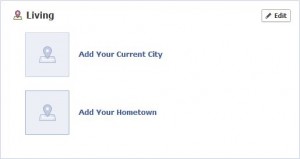
- Scroll down until you see the “living” tab and click “edit”. Delete your current and past cities.
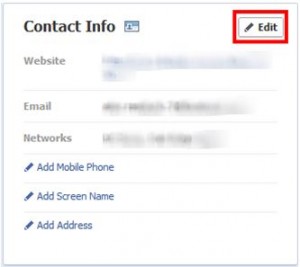
- Next, scroll down to “Contact Info” and click the “edit” button. If you’ve accidentally added your phone number and/or address, delete it.


With the fastest growing segment of identity theft being among kids and teens, it’s important that you help your children take these precautionary safety measures if they haven’t already. Aside from the unhealthy, adult-intended content on the social network (inappropriate photos, adult groups, language, the list goes on), Facebook’s registration process encourages users to divulge far too much personal and geographical information.
I founded Yoursphere.com because I knew it was possible to offer children a fun and positive social networking experience without tricking them into giving away any personal information. I wanted to create a social network where privacy is the standard and education about important issues like online safety and cyberbullying are integrated right into the social networking experience. Our members have embraced this philosophy, taking the education into their own hands and teaching other members what it means to be safe online, why they should think before they post, and the difference they could make by choosing to be kind to others online.
If you would like to learn more about how we teach safety and privacy in Yoursphere, and how to easily teach it to your own children based on their age, you can follow this guide.
Finally, Delete Your Financial Information from Online Stores
E-commerce sites like Amazon give people the option of storing credit card and billing information on Amazon’s servers in order to make purchasing easier and faster. Though I understand the reasons for taking advantage of this service, I started realizing the risks of doing so shortly after the PlayStation Network was hacked.
The PlayStation Network incident put millions of PlayStation user’s personal information into the hands of criminals, and there was nothing anyone could do about it except check with their banks and change the passwords on their accounts. Seeing how easily a large international, multi-million dollar company like Sony could lose all of that information made me realize that other online vendors are no exception. As a safety precaution, I deleted all of my financial information from Amazon. Sure, it makes the process of purchasing products from them a little slower, but in the end having my financial information secure is worth the inconvenience.

