
Is Social Media Making Your Kids Less Smart?
Last updated on March 2nd, 2018 at 02:49 pm
 Eight in ten teens have a profile on at least one of the many social media websites out there and most of them are on it daily, according to a recent report.
This is hardly big news if you have a teen in the house – or even a tween like I do. Although social sites like Facebook and Instagram require users to be at least 13 years old, many of my daughter’s friends had Instagram accounts since fifth grade. My burning question: How’s all this posting, tweeting, and liking going to affect getting good grades?
In college students, at least, it doesn’t seem to make a difference. In a study at the University of New Hampshire, 63 percent of undergrads who used social media for an hour or more a day got As and Bs compared to 65 percent who used it for a half-hour or less. But, research from a couple of years ago on middle- and high-school students suggests that social networking is a big distraction. The researchers from the University of California observed students studying in their homes for 15 minutes afterschool. They found that the kids who checked Facebook once during that studying time had lower grades than students who stayed on task. I wonder if this problem might have been solved with one simple rule we have at home: You can’t check your phone, iPod, or other electronic device until after all homework is done.
The American Academy of Pediatrics also has weighed in on the use of social media websites by tweens and teens. In reading over the report, I was surprised about the educational benefits of social media that the group listed, including “enhancement of individual and collective creativity” and the “expansion of one’s online connections through shared interests to include others from more diverse backgrounds.” I never really thought about it, but I guess all those cute photos with sayings that the kids are always posting and re-posting on Instagram are pretty creative. And the ability to connect with kids of the same age from around the world could definitely give your child a more global view.
I suppose what it all comes down to is supervision. The TV time limits we had when my daughter was younger have simply been redefined to include anything electronic – whether it’s texting, Facetiming, social networking, or watching Good Luck Charlie. If her grades slip, we’ll have to re-visit the issue, of course. But, for now, I’m okay with it. How about you?
Facebook Changes Privacy Policy for Teens: Are We Ok With This?
Last updated on March 2nd, 2018 at 02:54 pm
On Wednesday October 16th, Facebook announced 2 significant changes to its privacy policies for teens.
First – the good:
 In general with Facebook, you can control who you share your status updates with – whether it be with a single person or multiple people simultaneously. Up until yesterday, when someone aged 13 through 17 signed up for a new Facebook account, the “audience” for their posts (i.e. who could see what you posted online) was set by default to “Friends of Friends”. Now the teen could change this, but this was the initial setting, which meant that unless the teen knew about this, and was savvy enough to change this, there was a fairly large audience that could see not only their initial post, but all future posts. The good news: Now, when a teen signs up for a Facebook account, the initial audience for their first post will be set to the more limited choice of “Friends”.
Next – the not so good:
According to the Facebook press release, teens now have the “choice to post publicly on Facebook… …In addition, teens will be able to turn on Follow so that their public posts can be seen in people’s News Feeds”.
 What does this mean? Teenagers (ages 13 to 17) can now post status updates, videos and images on Facebook that can be seen by anyone, not just their friends or people who know their friends. According to the press release, “the changes are designed to improve the experience for teens on Facebook…teens are among the savviest people using social media, and whether it comes to civic engagement, activism or their thoughts on a new movie, they want to be heard.”
In truth, teens can already post publicly (and are doing so) on sites such as Twitter, Instagram, ask.fm and Kik. But the key difference, according to NY Times journalist Vindu Goel in his article Facebook Eases Privacy Rules for Teenagers, is that “Facebook requires users to post under their real identities”.
Of course this is incredibly attractive to companies that market products to children – the more information, the better the targeting. But how risky is this?
 According to Facebook, they have taken teen safety into consideration with inline reminders that pop-up whenever a teen chooses public as the audience for a post…and a second time if they continue posting publicly. But is this enough? Lawmakers continue to debate the threats to children from online sexual predators and cyber-bullying, particularly in the wake of the recent Rebecca Sedwick suicide and subsequent arrest of the two teenagers whose constant bullying – authorities say – led to her death.
One final consideration: according to the NY Times article mentioned above, the FTC is conducting an inquiry into other proposed changes in the Facebook’s privacy policies. One change in particular would give Facebook permission to take a user’s post and turn it into an advertisement to be broadcast to anyone who could have seen the original post. Implication – your teen’s foolish spur of the moment public post could one day turn into an ad that is broadcast to the world. And again, keep in mind – it was posted under their real name.
So, has Facebook upped the “risk” quotient when it comes to kids and the internet? I think so.
What do you think???
How to Delete Your Child’s Instagram Account and Why It Matters
Last updated on March 3rd, 2018 at 10:20 am
 There are many reasons you might want to delete your child’s Instagram account. For starters, Instagram’s Terms of Service requires that a member be at least 13 years of age to join, so if your child (12 and under) has an account, they’ve obviously lied about their age. But beyond that, your child could be dealing with other problems on Instagram, like cyberbullying, sexting, child predation, access to porn or other concerning content that you can’t even imagine. You can read more about what kids, teens, parents and teachers have experienced on Instagram by reading the comments section of this article. These are all very legitimate reasons to delete your child’s account until you feel they are mature enough to understand the consequences of their online actions and to follow your family’s technology rules.
Unless you have direct access to their account via the web version of Instagram or through services like Statigram (both of which require your child’s username and password), it’s nearly impossible to know what your child is posting, who they’re engaging with, and more importantly, who’s engaging with them. That’s why it is absolutely critical to keep an open dialogue with your child about these issues, so that, if and when it’s necessary, they’ll know exactly why you’re making the decision to delete their account and what needs to happen in order for them to get it back. They need to know that this is not about you being mean, overprotective, or controlling; it’s about being their parent and making a decision that’s best for them at this time in their life. Keep in mind, if you choose to delete their Instagram account, everything that belongs to that account will be permanently deleted and that username can no longer be used.
1. Log into your child’s Instagram account by going to www.instagram.com

2. Once logged in, click the username in the top right. From the options provided, click Edit Profile.

3. On the bottom right of the next page, you’ll see a link that says “I’d like to delete my account.”

4. On the next page, just provide a reason why you’re deleting the account (if you don’t want to get into it you can just choose “other reason”). Enter your child’s password one last time, then click the red “Permanently deactivate my account” button.

Preventative Measures
Deleting an account doesn’t guarantee your child won’t use Instagram again. They could easily re-download the app or skip the app entirely and just go with the web version of Instagram. Of course, no two children are alike when it comes to following the rules, so this just once again drives home the importance of talking to your child about the issues that caused you to delete their account in the first place.
Now, though you could block the website on your browser at home, there isn’t much you can do to prevent your child from creating an account on Instagram’s website, assuming they go out of their way to do so. And as far as parental controls go on Android phones, they don’t offer much, if anything at all. If your child uses an iPhone or iPod Touch, however, it’s very easy to set a restriction that prevents them from downloading the Instagram app. And let’s be honest, the true draw to Instagram is its mobile app.

On your child’s iDevice, tap the Settings icon.

On the Settings screen, tap General.

Then, tap Restrictions.

You’ll want to tap Enable Restrictions, which will require you to create a passcode. This step is key to preventing your child from re-downloading Instagram.

Scroll down a bit and tap Apps on this screen.

And this is where you want to be. Though Instagram only allows users 13 and older, Apple has categorized their app under 12+, so what you need to do here is tap 9+. Doing this not only prevents your child from downloading Instagram, it prevents Instagram from even showing up in the App Store.
You can learn more about iPhone, iPod Touch, iPad and iTunes safety at Yoursphere for Parents.
Kik – What It Is and What Parents Need to Know
Last updated on March 2nd, 2018 at 04:33 pm
 Sexting has parents concerned – and rightfully so. A byproduct of this concern is a heightened sense of awareness that we’re seeing from parents. I get emails every day from parents asking me how to prevent their child from downloading certain apps, and what’s the best way to monitor what their child is doing on their smartphone. Sexting continues to be an underlying concern in all of these conversations — probably because kids and teens use their smartphones to text more than anything else, and according to kids in the UK, sexting is just the new way to flirt. But what a lot of parents aren’t aware of is the fact that their child doesn’t need to be on a texting plan in order to text. There are plenty of third-party apps that offer texting services for free, and one that has come up in several conversations that I’ve had with parents is Kik.
What Is Kik?
Kik is an instant messenger app—think AIM chat or texting. The app is available for free on all mobile platforms, and is well-received by the millions of people, mainly because it can replace a texting plan through their cell provider. Through their data plan or Wi-Fi connection, Kik users can send and receive text messages and photos to an individual on their Kik contact list, or they can start a group chat with several Kik contacts. Instead of using phone numbers, each Kik member has a username. This username can be accompanied by a profile photo, if the user wishes, but ultimately this is Kik’s way of creating a sense of privacy among their users.

Inviting People to Kik

Kik users can use the Invite a Friend option to invite new people to connect with them on Kik. This can be done in several ways, but the method that poses the greatest risk to your child’s privacy and safety is the ability to invite people via social networks. With the click of a button, your child can reach out to the public communities on Facebook, Twitter, MySpace and Tumblr (among many others) with the message “Kik me”. No surprise here, “Kik me” is Kik’s way of starting a new instant message conversation between the sender and the recipient, whoever they may be.
Kik users can also manually search for someone’s Kik username and start a conversation that way, or they can dig into their phone’s contact list to see who’s already on Kik. Of course, the latter is a much safer approach to connecting with people on Kik since these people are already known to the user in some form or another.
Privacy and Parental Controls
Though Kik makes it easy to block other Kik users and ignore message notifications from new people, they offer zero parental controls, leaving it up to the child or teen to set these privacy settings on their own.
Another Kik safety concern that you should be aware of, and this is credited to Michael Sheehan’s blog titled “Parents Beware: Instagram & Kik Messenger Are a Dangerous Combination & What Social Dangers to Check For”, is the fact that kids and teens are sharing their Kik username on public social networks, like Instagram, through comments and profiles. As you can imagine, doing this opens the door to unwanted solicitations from Internet trolls, “pervs” and cyberbullies. In Michael’s case, his daughter’s friend received a request to chat on Kik via Instagram and the next thing she knew she was being asked to send naked photos of herself.
——————————-
The reason I wrote this piece wasn’t to bash Kik or to tell you that it’s an unsafe app for your child or teen; whether you feel it’s safe enough is entirely up to you and the maturity level of your child. But just like with any app or website that isn’t specifically created for children (and thus COPPA compliant), the safety and privacy risks tend to be more prevalent. With that being said, if your child is 12 or younger, they shouldn’t be using Kik at all. If your 13 or older teen prefers to use Kik instead of texting, and you’re saving some money in the process, you don’t need to delete the app from their phone, just have a very serious conversation with them about the safety risks involved with sharing their Kik username in public social networks and forums. While you’re at it, take five minutes to make sure they’re using the privacy settings.
The Internet will never be a totally “safe place” for our children, so we as parents have to remain vigilant and educated in order to take what we learn and pass it on to our kids.
Recent Study Highlights Importance of a Digitally Educated Parent
Last updated on May 24th, 2018 at 05:27 pm
 A recent study conducted by the Hart Research Associates for the Family Online Safety Institute (FOSI) found that when teens look to seek out information about how to stay safe online, nearly three in four (74%) turn to their parents. The study also found that parents and teens indicate similar levels of concern for a number of negative potential outcomes of teens’ online behaviors and activities.
In an ever-changing digital world where our children are more immersed than we’ll ever be, these findings are very heartening to read. What it essentially means is that the research we do as parents to stay on top of digital trends and safety issues is not fruitless. It means we can work more closely with our children to help them learn what it means to be safe online, and that our input holds some weight. Looking at this data, it becomes apparent that there really isn’t a better time to get involved in what’s going on in your child’s digital life.
All of that being said, however, in order to educate our children effectively we need to educate ourselves effectively, too. We all know how a person’s credibility can change dramatically when they give bad or outdated advice—this same rule applies to the way we converse with our children about digital safety. Reading articles and brushing up on statistics is only half the battle. As parents in the 21st century, we need to immerse ourselves in the technology and social media as much as possible. This means keeping up-to-date on the latest technologies and online trends by either using the services and products yourself, or by relying on information resources (like Yoursphere for Parents and Common Sense Media) to keep you in the loop on a daily or weekly basis.
Understandably, it can be difficult to keep up with the latest developments in technology and social media when you have to balance several plates in your life, and sometimes the idea of doing so can be overwhelming, but it’s absolutely necessary. As a starting point, I’ve provided a few general Internet-safety concerns below, along with the solutions that you can teach to your teen or child.
1. Social sites like Facebook, Twitter, Tumblr and Instagram were created for adults.
- The content, culture and people on these networks pose very real safety and privacy issues for our children. Profiles are automatically set to public, personal information is requested and sometimes
 required to sign up, and very little to zero content moderation takes place. Images including nudity and porn, and violent/sexual games are pervasive. Social media is clearly here to stay, yet our children and young teens deserve an age-appropriate and healthier experience. This is why I founded Yoursphere.com. It was time to create a network created with the best interests of our children in mind, to give kids the best of social media, minus these pitfalls.
2. Privacy.
- First, know that it’s against a federal law called the Children’s Online Privacy Protection Act (COPPA) for any child under the age of 13 to be a member of Facebook, Twitter, Tumblr, Instagram and any other social network or website that requests personal information from their users.
- Too many Facebook users rely on the social network’s default privacy settings, believing that they are sufficient enough to protect their privacy. The reality is, the out-of-the-box privacy settings give you very little control over who sees the content you post, the people you’re friends with and the personal information you entered when you signed up. Ultimately, Facebook doesn’t want your profile to be private; they want it to be as open as possible because it’s beneficial to their partners and business model. Guide to Facebook’s Timeline Privacy Settings.
- This is why we comply with COPPA at Yoursphere. Children under the age of 13 are able to join Yoursphere because of our compliance. In addition, user profiles at Yoursphere are always set to private, and we don’t provide an option to make them public.
3. Cyberbullying
- Cyberbullying can come from anyone; it isn’t limited to the scowling angry kids on the playground like typical bullying is. David Greenwood, a writer for the Huffington Post, defined bullying as “when a child repeatedly uses threats to control another child’s behavior”.
- We recently published a comprehensive cyberbullying guide which gives parents a five-step plan for combating and documenting online bullying. It also outlines the methods children use to bully their peers.
- Cyberbullying is a perfect example of why education about citizenship is key. As we teach in Yoursphere, children need to learn why treating others with kindness and respect is important.
4. Sexting
- If you think your child may be sexting, try opening up a dialogue with them and keep it going on a regular basis. During your conversations, discuss the repercussions of sexting, the fact that once their photo is on the Internet it becomes public and permanent, and how these consequences could ruin their future plans to attend college or start their career.
- If your child doesn’t have a smartphone yet, consider holding off until you feel they’re mature enough to handle the responsibility. Bear in mind, a smartphone is a handheld computer that’s connected to a satellite in outer space!
- Lastly, take advantage of the cell phone monitoring tools available to you through your service provider. There are several good options that can give your family peace of mind and cost next to nothing.
Remember, FOSI’s research proves that your children are counting on you to help them navigate the digital world. It’s up to you to familiarize yourself with the issues and solutions, steer them in a healthy direction and to pass that information onto your children when the time is right.
Protect Your Family’s Privacy & Financial Information Online
Last updated on March 2nd, 2018 at 04:50 pm
Much has been said about people being tracked while they browse the web, which is something that ad agencies and marketing firms do in order to “personalize a user’s experience”.
How do you know if you’re being tracked? Well, it happens in the background all the time.
 Say you’re browsing Amazon or Google for a home security system, or you’re writing an email to your sister, asking her for recommendations on different home security providers, and 30 seconds later you see an ADT ad on a website that has nothing to do with home security systems – that’s the end result of what some people consider an invasion of privacy on the Internet, and just one example of it.
Like they say, this tracking technology can make your web browsing experience much more convenient, but not everyone subscribes to that idea. If you’re someone who doesn’t, there are several ways to prevent ad agencies and marketing firms from accessing your or your family’s information or browsing history.
Use Tor as Your Web Browser
Tor Browser is an open source web browser that protects your information and web activity from companies and individuals that track – or for more malicious purposes, such as gaining access to financial information that is stored on your computer. Tor works by bouncing your Internet connection around a secure, volunteer-run worldwide network, so if someone wanted to track you they would have to track your computer through all the connections around the world instead of just the single connection from your home or office. The good thing about Tor is it works with all websites and it’s just as fast as your everyday web browsers, such as Chrome and Firefox. The only downside is that Tor takes a little longer to start up, due to the fact that it needs to establish a connection with the worldwide network.
To download Tor Browser for your computer go to https://www.torproject.org/ and click the “Download Tor” button. Tor is free and available for Windows, Mac, and Linux based operating systems.
Disable Tracking Cookies on Your Computer
Simply put, cookies are small, encrypted Internet files that live on your co
mputer. They are meant to make your browsing experience faster by remembering passwords, usernames, emails and other stored information. These cookies are called “first-party cookies”.
The ones you want to delete regularly are called “third-party cookies”. These cookies are designed to track and analyze your web browsing habits and relay that information back to ad networks or marketing firms.
By disabling third-party cookies you can make browsing the Internet a more private experience for you and your children. And if you’re like me, you’ll feel better that marketing firms aren’t collecting data on your child and storing it on a server somewhere.
You can learn how to disable third-party cookies on any browser by following this step-by-step guide.
Clean Up Your Social Media Accounts
Social media accounts are a gold mine for marketing firms who want to find personal information about individuals in order to better target them with ads. Facebook is especially vulnerable since all your personal information is organized and out in the open on your profile. And despite the fact that children under 13 are not legally “allowed” to use Facebook, a large percentage of them find a way to access it one way or another, which means your child’s data is at risk as well.

“The guts of the issue, especially as it relates to your child, really comes down to what your child is sharing online with others. (…see Three Good Reasons Why Your child Shouldn’t Be on Facebook). Are they casually giving out their home address? Are they posting the name of their school on Facebook? Are they announcing to everyone that they recently changed their cell phone number? Because Facebook is a social network for adults where open networking is encouraged, questions like these are integrated right into the sign up process. The important thing to realize here is that children will willingly give out this information, though it’s not required of them, just because they were asked. As you can imagine, this is where a child’s privacy and safety become jeopardized.“
Below is a step-by-step mini guide that outlines how to delete any personal information from your profile that could let scammers know where you live. Also, remember to avoid posting photos of your house or the general area where you live – this seems like a no-brainer but sometimes we get caught up in the moment and overlook the amount of personal detail in a photo.
- First, log into your Facebook account. On your profile, click the “about” link below your profile picture.
- Scroll down until you see the “living” tab and click “edit”. Delete your current and past cities.

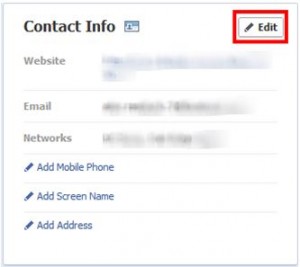
- Next, scroll down to “Contact Info” and click the “edit” button. If you’ve accidentally added your phone number and/or address, delete it.


With the fastest growing segment of identity theft being among kids and teens, it’s important that you help your children take these precautionary safety measures if they haven’t already. Aside from the unhealthy, adult-intended content on the social network (inappropriate photos, adult groups, language, the list goes on), Facebook’s registration process encourages users to divulge far too much personal and geographical information.
I founded Yoursphere.com because I knew it was possible to offer children a fun and positive social networking experience without tricking them into giving away any personal information. I wanted to create a social network where privacy is the standard and education about important issues like online safety and cyberbullying are integrated right into the social networking experience. Our members have embraced this philosophy, taking the education into their own hands and teaching other members what it means to be safe online, why they should think before they post, and the difference they could make by choosing to be kind to others online.
If you would like to learn more about how we teach safety and privacy in Yoursphere, and how to easily teach it to your own children based on their age, you can follow this guide.
Finally, Delete Your Financial Information from Online Stores
E-commerce sites like Amazon give people the option of storing credit card and billing information on Amazon’s servers in order to make purchasing easier and faster. Though I understand the reasons for taking advantage of this service, I started realizing the risks of doing so shortly after the PlayStation Network was hacked.
The PlayStation Network incident put millions of PlayStation user’s personal information into the hands of criminals, and there was nothing anyone could do about it except check with their banks and change the passwords on their accounts. Seeing how easily a large international, multi-million dollar company like Sony could lose all of that information made me realize that other online vendors are no exception. As a safety precaution, I deleted all of my financial information from Amazon. Sure, it makes the process of purchasing products from them a little slower, but in the end having my financial information secure is worth the inconvenience.

